|
|
我从rhinoscriptingresources.blogspot.com/上找到的切片的脚本,欣喜若狂……没想到出现了这样的问题。。。
第一个这是这个脚本视频演示的截图
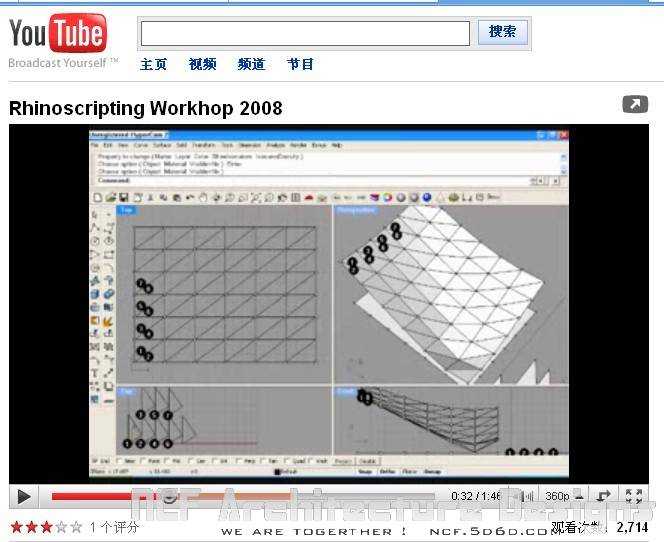
会出现3角的面,然后出现编码在每一个三角的切片上
这是我的尝试的截图:
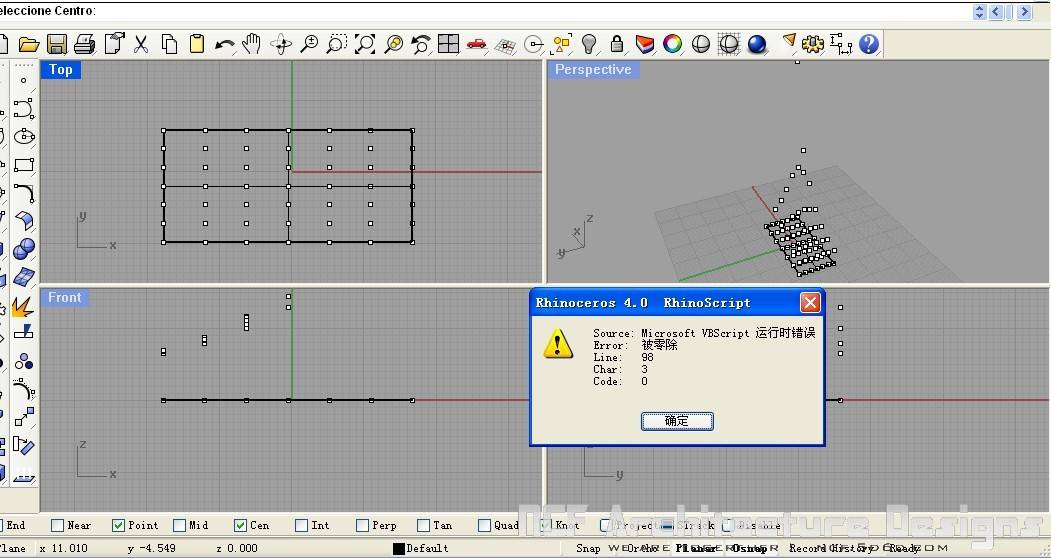
我不知道问题出在哪。。。有时候不出现这个错误了,可以进行了,但是每一个算出来的切片都重叠在一个范围内,并且没有切片上的编码……
哪位高手出来帮我解决下啊~小弟不胜感激……
下面是这个脚本:
Call Main
Sub Main
Dim div
div = Rhino.IntegerBox("Numero de Divisiones: ")
Call crearMalla(div)
End Sub
Function crearMalla(divisions)
'min,max in u direction
Dim umin, umax
'min,max in v direction
Dim vmin, vmax
'variable for surface domain
Dim superficiedomain
'how many divisions on surface
'variable for surface
Dim superficie
Dim i,j
Dim uDir, vDir
ReDim puntos(divisions, divisions)
'get surface
superficie = Rhino.GetObject ("dame una superficie!!!",8)
'get surface domain in u direction
superficieUdomain = Rhino.surfacedomain (superficie,0)
'get surface domain in v direction
superficieVdomain = Rhino.surfacedomain (superficie,1)
umin = superficieUdomain(0)
umax = superficieUdomain(1)
vmin = superficieVdomain(0)
vmax = superficieVdomain(1)
'looping
For i = 0 To divisions
For j = 0 To divisions
'get parameter location in grid
uDir = (i * (umax - umin)/divisions) + umin
vDir = (j * (vmax - vmin)/divisions) + vmin
'get 3d location in scene using parameters
punto = Rhino.evaluatesurface (superficie, Array(uDir, vDir))
puntos(i,j) = punto
'add 3d location to scene
Rhino.addpoint punto
Next
Next
Rhino.Print "Coordenada Z de punto 0,0: " & puntos(divisions,0)(2)
Call moveAroundCenter(puntos, divisions)
End Function
Function moveAroundCenter(pt, div)
'Esta funcion toma una reticula de puntos y los levanta todos un valor aleatorio entre 0 y 4
Dim center
Dim largo, ancho
Dim distancia, delta
ReDim newPts(div, div)
'Distancia entre el punto 0,0 del arreglo y el punto 0,div
ancho = Rhino.Distance ( pt(0,0), pt(0,div) )
Rhino.Print "Ancho de la base de la nube de puntos: " & ancho
largo = Rhino.Distance ( pt(0,0), pt(div,0) )
Rhino.Print "Largo de la base de la nube de puntos: " & largo
center = Rhino.GetPoint("Seleccione Centro")
ReDim npt(2)
For i = 0 To div
For j = 0 To div
distancia = Rhino.Distance(center, pt(i,j))
delta = 2/distancia*100
npt(0) = pt(i,j)(0)
npt(1) = pt(i,j)(1)
npt(2) = pt(i,j)(2) + delta
newPts(i,j) = npt
Rhino.AddPoint(npt)
Next
Next
Call creategeom(newPts,div)
End Function
'-----------------------------------------------------------------------------
'------------------------------------------------------
'create geometry using point--------------------------
Function creategeom(npt,div)
Dim triLinesUno(2)
Dim triLinesDos(2)
ReDim triArrayUno(div, div)
ReDim triArrayDos(div, div)
For i=0 To div -1
For j=0 To div -1
Rhino.Print"HERE======================="
Rhino.Print npt(i,j)(0)
triLinesUno(0) = Rhino.addline (npt(i,j), npt(i+1,j+1))
triLinesUno(1) = Rhino.addline (npt(i,j), npt(i+1,j))
triLinesUno(2) = Rhino.addline (npt(i+1,j),npt(i+1,j+1))
triLinesDos(0) = Rhino.addline (npt(i,j), npt(i,j+1))
triLinesDos(1) = Rhino.addline (npt(i,j), npt(i+1,j+1))
triLinesDos(2) = Rhino.addline (npt(i,j+1),npt(i+1,j+1))
triArrayUno(i,j) = Rhino.AddPlanarSrf (triLinesUno)
triArrayDos(i,j) = Rhino.AddPlanarSrf (triLinesDos)
Next
Next
Dim boundingBox
Dim lstObj
Dim tempBound
For i= 0 To div - 1
For j= 0 To div - 1
If i = 0 And j = 0 Then
Rhino.SelectObject triArrayDos(i,j)(0)
Rhino.Command "UnrollSrf " & " Enter"
Rhino.UnSelectAllObjects()
lstObj = Rhino.LastObject()
boundingBox = Rhino.BoundingBox(lstObj)
Rhino.UnSelectAllObjects()
Else
Rhino.SelectObject triArrayDos(i,j)(0)
Rhino.Command "UnrollSrf " & " Enter"
Rhino.UnSelectAllObjects()
lstObj = Rhino.LastObject()
boundingBox = tempBound
Rhino.MoveObject lstObj, Array(0,0,0), BoundingBox(3)
End If
Rhino.SelectObject triArrayUno(i,j)(0)
Rhino.Command "UnrollSrf " & " Enter"
lstObj = Rhino.LastObject()
Rhino.MoveObject lstObj, Array(0,0,0), BoundingBox(1)
tempBound = Rhino.BoundingBox(lstObj)
Rhino.UnSelectAllObjects()
Next
Next
End Function |
-

-
切片.rvb
4.01 KB, 下载次数: 21, 下载积分: 照度 -1 lux
|


 辽公网安备21021102000973号


 狗仔卡

 发表于 2010-2-6 21:15:37
 提升卡
 置顶卡
 沉默卡
 喧嚣卡
 变色卡
 显身卡

 发表于 2010-2-6 22:23:20
 发表于 2010-2-7 09:26:09

 发表于 2010-2-9 22:16:32