|
|
本帖最后由 panhao1 于 2010-6-13 17:22 编辑
先看原文
来自http://www.grasshopper3d.com/forum/topics/guide-to-creating-custom?id=2985220%3ATopic%3A56785&page=4#comments
Ok. Finally sussed it. What a pain. Im using VS2008. Jon/David thanks for your input.
So
作者用VS2008 我还是用的VS2005,作者说的够详细了 而且绝对可行
所以我不做翻译,仅作补充说明,帮住那些刚开始做vs的童鞋
1. Assuming we are in debug mode, Project> Properties > Compile>Build Events
OK
copy "$(Targetpath)" "yourprojectnamehere.gha"
This is entered in the Post Build Command line. As per Ben's instructions.
首先要把文件后缀改成gha 而不是dll
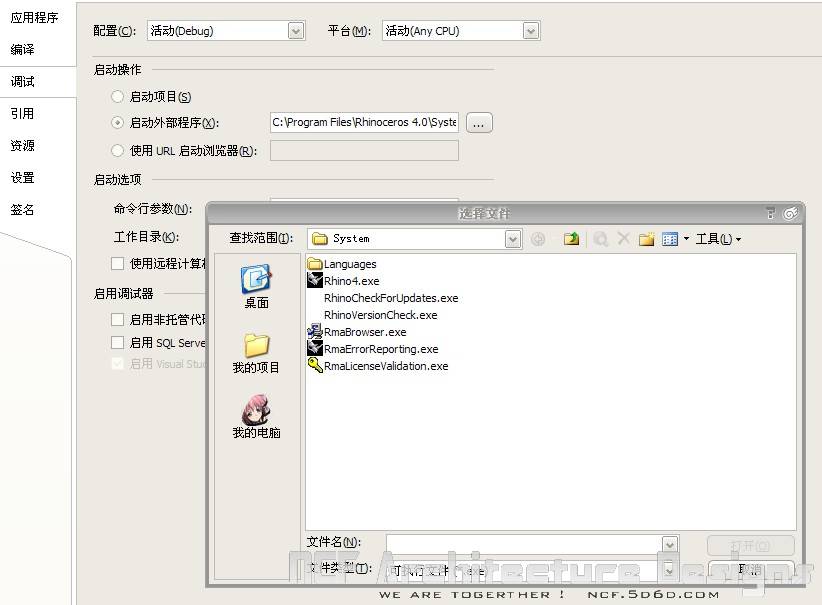
2 Project > Properties > Debug > Start External program
Set path to Rhino4.exe
As per David's instructions
在启动选项时选犀牛的可执行文件
3 Launch Rhino, type
_GrasshopperDeveloperSettings
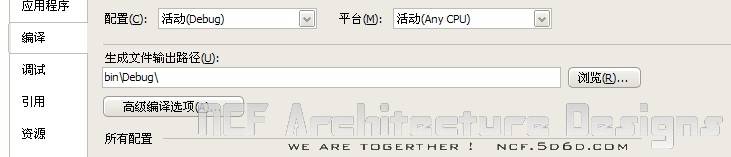
Then uncheck Memory load, and set path to your debug file location used by the VS2008 IDE
This is as per David's instructions
在犀牛输入很神奇的命令GrasshopperDeveloperSettings,再改下vs里的设置,主要是生成路径和覆盖文件选项
4 Tools > Options
Check Show All Settings on bottom left hand corner of dialog box
Select Debugging tree node
Uncheck
"Require Source files to exactly match the original version"
VIOLA, you shoudl be able to debug now in VS2008.
再把版本设置给改下就可以了
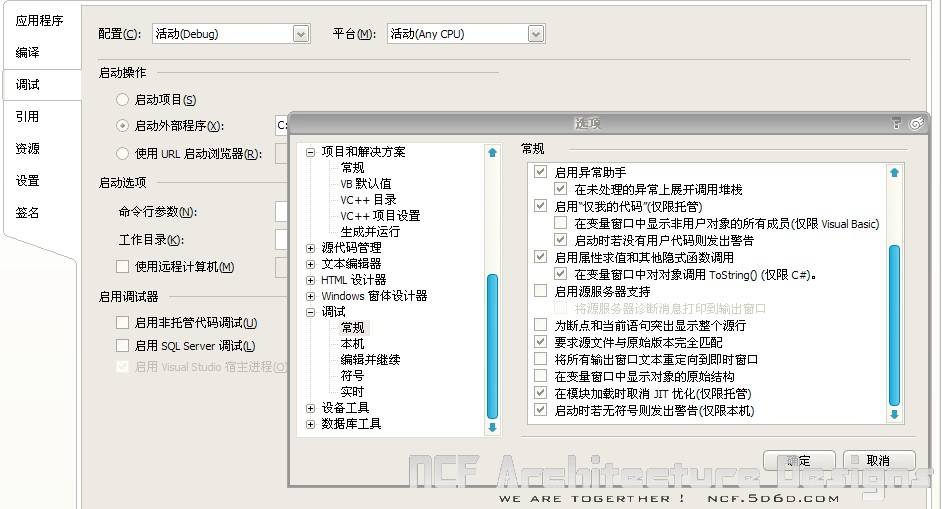
把要求原始版本XXOO选项的勾给去掉
cheers |
评分
-
查看全部评分
|


 辽公网安备21021102000973号


 狗仔卡

 发表于 2010-6-13 17:21:01


 提升卡
 置顶卡
 沉默卡
 喧嚣卡
 变色卡
 显身卡

 发表于 2010-6-13 18:17:50

 发表于 2010-6-13 18:21:10

 发表于 2010-6-13 19:38:51


 发表于 2010-6-16 19:49:28