|
|
楼主 |
发表于 2014-6-29 18:44:12
|
显示全部楼层
问题搞了我一天,还未解决
如何将此次生成的结果曲线,作为下一步偏移的起始曲线?
虽然我找到了一个函数Rhino.offsetcurveonsurface
可以直接运行一次“曲线在曲面上的偏移”,生成了第一根偏移后的曲线,
但是后续的循环过程就进行不下去了,出错。如下图:
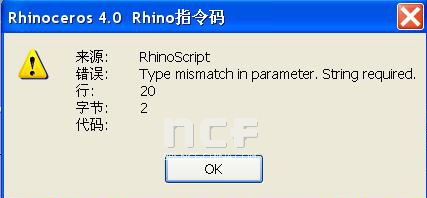 我用vrhino.print vartype(new_strCurve)的方式检查 new_strCurve = Rhino.offsetcurveonsurface ( strCurve, strSurface, dblDistance) 生成的new_strCurve 的数据类型,得到的数字是8204,
而弹出的错误对话框中说是要一个string,这个就是关键问题,如何从“8204”的那种类型转化到string?
简单地说:
如何将此次生成的结果曲线,作为下一步偏移的起始曲线?
Option Explicit
Call chm_OffsetCurveOnSurface()
Sub chm_OffsetCurveOnSurface
Const rhCurve = 4
Const rhSurface = 8
Dim strCurve, strSurface, arrPoint, dblDistance, arrParameter ,x, arrObjects, new_strCurve, arrDomain
dblDistance = 100 '偏移距离
strCurve = Rhino.GetObject("Select curve on a surface", rhCurve)
If IsNull(strCurve) Then Exit Sub
strSurface = Rhino.GetObject("Select base surface", rhSurface)
If IsNull(strCurve) Then Exit Sub
new_strCurve = Rhino.offsetcurveonsurface ( strCurve, strSurface, dblDistance)
If IsNull(new_strCurve) Then Exit Sub
For x = 1 To 6 Step 1
new_strCurve = Rhino.offsetcurveonsurface ( new_strCurve , strSurface, dblDistance)
If IsNull(new_strCurve) Then Exit Sub
Next
End Sub
|
|


 辽公网安备21021102000973号


 狗仔卡

 发表于 2014-6-28 18:55:38
 提升卡
 置顶卡
 沉默卡
 喧嚣卡
 变色卡
 显身卡
 发表于 2014-6-28 20:38:36



 发表于 2016-7-8 10:32:39