|
|
刚刚学习vb scripting,看到教程上的例子,不太懂,于是拿出来希望大家能解答解答。直接上图
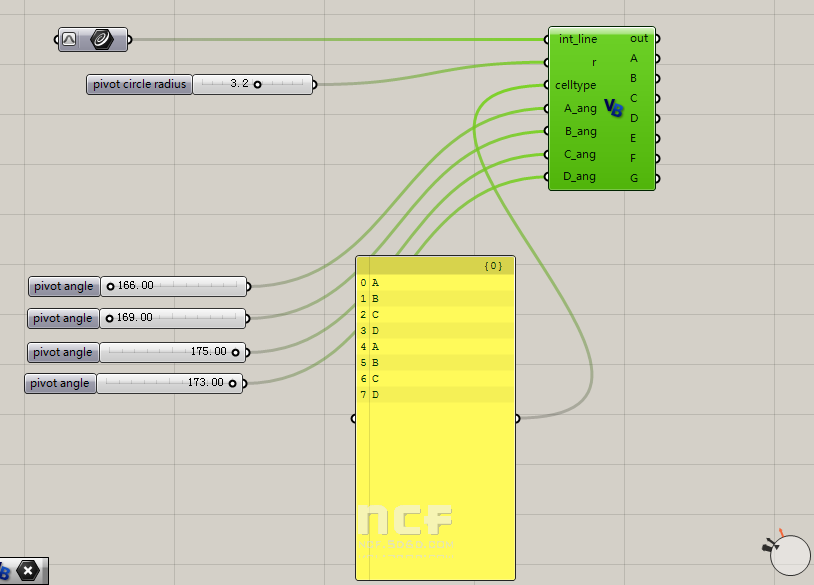 这是程序的vb电池图,外面的一些输入数据和输出数据
以下是vb的代码
Private Sub RunScript(ByVal int_line As Line, ByVal r As Double, ByVal celltype As List(Of String), ByVal A_ang As Object, ByVal B_ang As Object, ByVal C_ang As Object, ByVal D_ang As Object, ByRef A As Object, ByRef B As Object, ByRef C As Object, ByRef D As Object, ByRef E As Object, ByRef F As Object, ByRef G As Object)
'defines output parameters //////////////////////////////////////////////////////////////////////////////////////
Dim pivot_cell_list As New list(Of circle)
Dim pivot_pt_list As New List(Of point3d)
Dim start_leg_list As New List(Of Line)
Dim start_leg_pt_list As New List(Of point3d)
Dim end_leg_list As New List(Of Line)
Dim end_leg_pt_list As New List(Of point3d)
Dim end_crv_list As New List(Of Line)
'defines output parameters of "component" subroutine /////////////////////////////////////////////////////////////
Dim pivot_cell As circle
Dim pivot_pt As point3d
Dim start_leg As line
Dim start_leg_pt As point3d
Dim end_leg As line
Dim end_leg_pt As point3d
Dim end_crv As line
'defines rotation_ang ///////////////////////////////////////////////////////////////////////////////////////////
Dim rotation_ang As Double
'checks component types and computes output based on the types /////////////////////////////////////////////////
For i As Integer = 0 To celltype.Count - 1
If i = 0 Then
If celltype(i) = "A" Then
rotation_ang = A_ang
Else If celltype(i) = "B" Then
rotation_ang = B_ang
Else If celltype(i) = "C" Then
rotation_ang = C_ang
Else If celltype(i) = "D" Then
rotation_ang = D_ang
End If
component(int_line, r, rotation_ang, pivot_cell, pivot_pt, start_leg, start_leg_pt, end_leg, end_leg_pt, end_crv)
Else
If celltype(i) = "A" Then
rotation_ang = A_ang
Else If celltype(i) = "B" Then
rotation_ang = B_ang
Else If celltype(i) = "C" Then
rotation_ang = C_ang
Else If celltype(i) = "D" Then
rotation_ang = D_ang
End If
int_line = end_crv
component(int_line, r, rotation_ang, pivot_cell, pivot_pt, start_leg, start_leg_pt, end_leg, end_leg_pt, end_crv)
End If
pivot_cell_list.Add(pivot_cell)
pivot_pt_list.Add(pivot_pt)
start_leg_list.Add(start_leg)
start_leg_pt_list.Add(start_leg_pt)
end_leg_list.Add(end_leg)
end_leg_pt_list.Add(end_leg_pt)
end_crv_list.Add(end_crv)
Next
'output /////////////////////////////////////////////////////////////////////////////////////////////////////////////
A = pivot_cell_list
B = pivot_pt_list
C = start_leg_list
D = start_leg_pt_list
E = end_leg_list
F = end_leg_pt_list
G = end_crv_list
End Sub
'
Sub component(ByVal start_crv As Line, ByVal pivot_cell_radius As Double, ByVal pivot_ang As Double, ByRef pivot_cell As Object, ByRef pivot_pt As Object, ByRef start_leg As Object, ByRef start_leg_pt As Object, ByRef end_leg As Object, ByRef end_leg_pt As Object, ByRef end_crv As Object)
'defines start_leg_pt //////////////////////////////////////////////////////////////////////////////////////////
Dim s_pt As New point3d(start_crv.PointAt(0.5))
start_leg_pt = s_pt
'defines start_leg /////////////////////////////////////////////////////////////////////////////////////////////
Dim start_crv_start As New Point3d(start_crv.PointAt(0.0))
Dim start_crv_end As New Point3d(start_crv.pointat(1.0))
Dim original_vector As New Vector3d(start_crv_start - start_crv_end)
Dim rotation_ang_start_leg As Double = math.PI / 2
Dim rotation_axis_start_leg As New Vector3d(0, 0, 1)
original_vector.Rotate(rotation_ang_start_leg, rotation_axis_start_leg)
Dim line_start As New line(start_leg_pt, original_vector, pivot_cell_radius)
start_leg = line_start
'defines pivot_pt //////////////////////////////////////////////////////////////////////////////////////////////
Dim p_pt As New point3d(line_start.PointAt(1.0))
pivot_pt = p_pt
'defines pivot_cell ////////////////////////////////////////////////////////////////////////////////////////////
Dim pivot_circle As New Circle(line_start.PointAt(1.0), pivot_cell_radius)
pivot_cell = pivot_circle
'defines end_leg ///////////////////////////////////////////////////////////////////////////////////////////////
Dim rot As transform = transform.Rotation(pivot_ang * math.PI / 180, vector3d.ZAxis, line_start.PointAt(1.0))
Dim rotated_leg As line = line_start
rotated_leg.Transform(rot)
end_leg = rotated_leg
'defines end_leg_pt ////////////////////////////////////////////////////////////////////////////////////////////
s_pt.Transform(rot)
end_leg_pt = s_pt
'defines end_crv ///////////////////////////////////////////////////////////////////////////////////////////////
Dim st_line As line = start_crv
st_line.Transform(rot)
Dim end_line_st_pt As New Point3d(st_line.PointAt(1.0))
Dim end_line_end_pt As New Point3d(st_line.PointAt(0.0))
Dim end_line As New line(end_line_st_pt, end_line_end_pt)
end_crv = end_line
End Sub
现在是我的问题,代码前半部分,就是sub component前面那部分的循环,到了最后那个component后面带括号的那部分是什么意思,还有在循环末尾,出现int_line=end_crv这是什么意思,希望高手能用通俗的话解释以下这个循环,谢谢了。 |
|


 辽公网安备21021102000973号


 狗仔卡
 发表于 2011-10-4 22:44:50
 提升卡
 置顶卡
 沉默卡
 喧嚣卡
 变色卡
 显身卡

 发表于 2011-10-5 09:29:01




 发表于 2011-10-5 18:20:22